
Start with findings
Open Live to review findings from recorded repeated actions, server failures or declared slow operations. Each finding should show its source, relevant counts and what to check next. You can inspect browser journeys or server activity for supporting detail.
Send a useful finding to Inbox, or link it to an existing ticket. Original recorded material stays available with the improvement it supports.
Check the collection status
Findings shows collection status for the selected website, or all websites in the project:
- Collection off: no new activity is being collected. Review collection settings before enabling it.
- Waiting for activity: collection is enabled, but eligible traffic, website permission and successful delivery are needed before activity appears.
- Recorded activity available: retained activity can be reviewed. This does not guarantee that new activity is arriving now.
- New activity paused or Daily collection limit reached: capacity or the daily limit blocks new journeys or event batches. Previously covered activity may finish; there are no automatic extra purchases.
- Installation needs verification or Collection unavailable: verify the current installation, or check deployment and project access.
Use the status action to reach the relevant settings or recorded activity in the same project. Internal team members can read the status; changing collection or reviewing project capacity requires the appropriate project role. Settings and limits can differ between websites and between browser journeys and app activity.
In App activity and server collection settings, Collection enabled describes the saved activation setting. It does not mean new signals are arriving now. Last delivery and Last signal show the actual recorded times; delivery gaps and capacity warnings remain visible. Connection instructions and longer privacy details can be opened when needed.
The latest retained browser journey is shown by UTC day. Last app signal received records a delivered app signal. A refreshed view is not proof of collection: after a temporary refresh error, Last checked describes the older status that is still displayed. If the server rejects your session or project access, the previous findings and status actions disappear. Empty Findings means no new finding was identified, not that the website has no problems. Collection & privacy keeps this guide in reach.
Activate collection deliberately
Today, opt-in Live uses the current project capacity meter on Free and Pro. A separate Live subscription is a planned pilot and is not available to buy yet. Collection starts off. In Project settings → Live collection, choose the environment, declare pages and actions, review the activation policy and enable the sources you want.
The website must have a verified installation and active project access. The same script loads the browser collector when allowed; another browser script is not required.
Declare reusable labels such as checkout, continue and purchase-confirmed. Do not use names, order IDs or personal messages as event labels.
Connect your website's permission choice
Under the site-permission policy, browser collection waits for AstorTest.live.allow(true). Connect your existing consent manager's current choice to this callback; use false before a choice, after a refusal and on withdrawal. Replay the current choice when the installation is ready:
let liveAllowed = false;

function handleAnalyticsPermission(allowed) {
  liveAllowed = allowed === true;
  window.AstorTest?.live.allow(liveAllowed);
}

window.addEventListener('astor:ready', () => {
  window.AstorTest?.live.allow(liveAllowed);
});
This is a callback example, not a built-in consent manager. Connect it to the appropriate choice for your website, including an initial read, reloads, SPA navigation and changes in other tabs. The reviewed activation basis is a separate project setting; it does not automatically establish a lawful basis for your website. A false callback also stops collection under that setting.
Withdrawal clears the browser's queued steps and temporary Live context, aborts an in-flight batch and sends a minimal session revocation. Once the server receives that revocation, it rejects later batches for the old session and removes its link to server outcomes. A later permission choice starts a new journey. Offline delivery can prevent the revocation from reaching the server; already accepted material remains subject to retention and the applicable deletion process. Stopping collection is not deletion of previous recordings.
Written feedback access and optional Mission recording have separate controls. Permission for Live does not grant project access or start a Mission recording.
Understand the coverage
Browser journeys contain declared pages, actions and application-reported outcomes. They do not contain visual replay video, entered values, page text, DOM snapshots or screenshots.
The permitted session uses temporary per-tab storage and can continue across navigation. A journey is not a unique person or a guaranteed complete purchase session. Script blockers, delivery gaps and capacity limits can leave missing steps.
A missing success event does not prove failure or abandonment. Server request counts do not prove unique visitors. Use a committed application outcome when you need a stronger signal than a click.
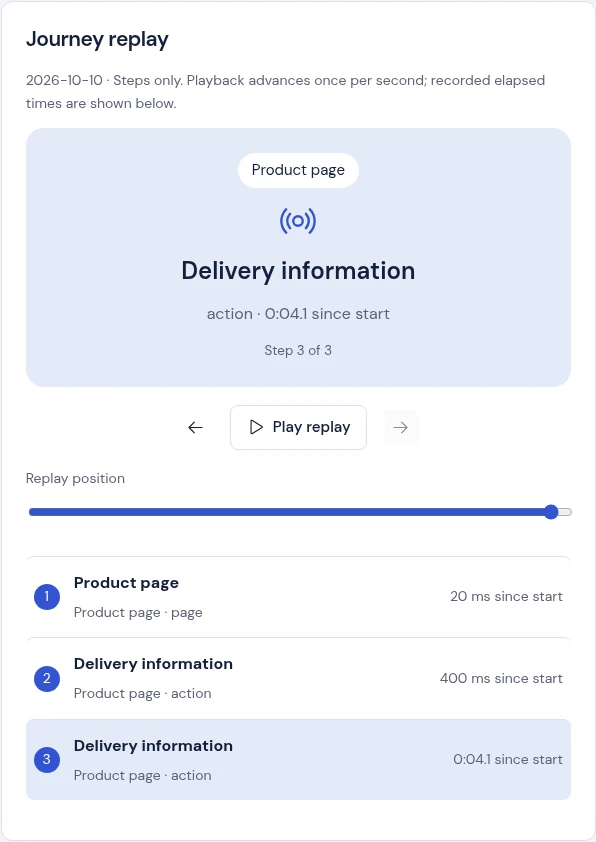
In Browser journeys, the listed time identifies the last received step since the journey began, not active attention or a guaranteed final duration. Journey replay shows each recorded step’s elapsed time with millisecond precision for small intervals. Playback still advances one step per second; it does not reproduce the original timing or video. An absent end event remains No end event.
 View full size · opens in a new tab
Retention and capacity
Each browser journey is limited to 200 steps or four hours. Collection accepts up to 1,000 new journeys per project per UTC day across its websites, subject to the remaining project pool. A monthly pool estimate does not promise that all traffic will be collected. Browser journeys lists the latest 50 retained journeys; that list is not the full history. A temporary refresh error keeps the already loaded journeys visible. The error clears after a successful refresh; a failed settings save remains separate and must be resolved. If the server rejects your current session or project role, the previous Live data and controls disappear while access is rechecked.
When the installation’s latest settings report exhausted capacity or the daily limit, it starts no new browser journey. Already acknowledged, permitted journeys can continue within their original limits. If a new journey reaches the daily limit during a race, collection stops rather than retrying throughout the day. Temporary ingestion errors still use bounded retries.
Settings refresh periodically, so a stale or older installation can still send a first rejected batch. Older saved journeys without an acknowledgement remain server-checked. This is a capacity stop, not sampling or a guarantee that all visitors were observed. Website permission and withdrawal remain separate.
Choose retention from the available 1, 7, 14 or 30-day options; the default is seven. History uses UTC calendar days, including the current day. The four-hour journey limit ends its temporary collection context; it does not shorten saved history to four hours. Pausing collection keeps recorded history within its configured retention. Live consumes the same project pool as other capacity work.
Review your website’s collection policy. Cookie-free collection is not automatically anonymous or exempt from permission requirements. Read privacy.
Astor’s own public website has a separate browser-collection policy. Browser collection paused means no new browser journeys are accepted for that website, including late batches. Requested feedback and retained activity remain available. It does not change your customer website’s settings.